Mètre Numérique — Télémètre / Surveillance
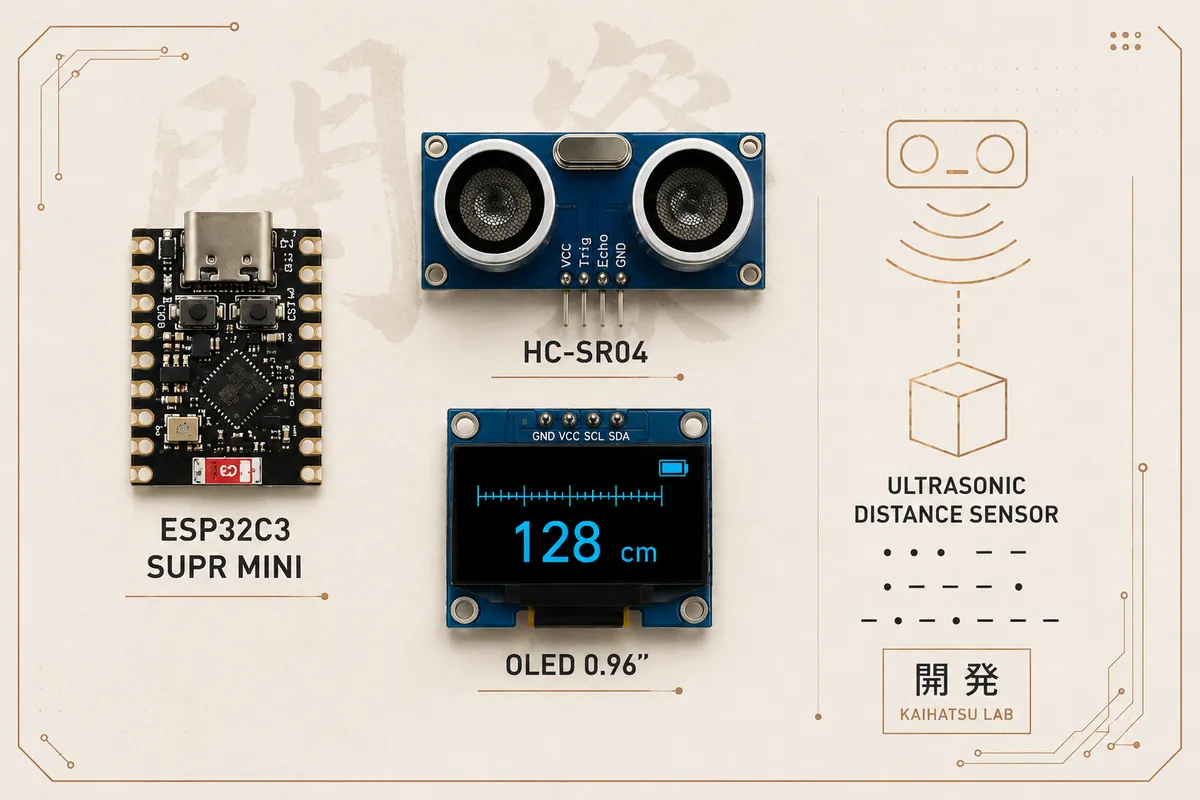
Télémètre ultrasonique basé sur un ESP32 30 broches, un HC-SR04 et un écran OLED SSD1306 128×64. Le projet mesure la distance, affiche une barre graphique, héberge une interface web locale et propose un mode surveillance capable d'envoyer une alerte par Gmail.
Le projet
La version réellement réalisée utilise un ESP32 classique au format 30 broches. L'OLED SSD1306 fonctionne en I²C sur GPIO 21 (SDA) et GPIO 22 (SCL), tandis que le HC-SR04 utilise GPIO 4 pour TRIG et GPIO 5 pour ECHO. Le capteur a été validé séparément avec l'écran : l'adresse I²C de l'OLED est 0x3C. Le mode surveillance permet de prendre la distance courante comme référence, de définir un seuil de variation et de confirmer un mouvement sur plusieurs mesures consécutives. Lorsque la variation est confirmée, l'ESP32 peut envoyer un email via le serveur SMTP de Gmail. L'interface web est servie directement par l'ESP32 et permet de consulter la distance, la barre graphique, l'état de la surveillance, la référence, le seuil et de lancer un email de test.
Étapes de réalisation
- Matériel validéESP32 30 broches + HC-SR04 + OLED SSD1306 128×64 I²C. L'OLED utilise l'adresse 0x3C et fonctionne sur GPIO 21/22.
- MesureLe HC-SR04 est déclenché sur GPIO 4 et son retour ECHO est lu sur GPIO 5. La distance est calculée à partir de la durée de l'impulsion ultrasonique, avec une plage logicielle de 2 à 450 cm.
- AffichageL'OLED affiche le mode Télémètre ou Surveillance, la distance en centimètres, l'état d'alarme et une barre graphique représentant la distance sur une échelle de 0 à 200 cm.
- Interface webLe serveur HTTP intégré à l'ESP32 expose une page de contrôle locale : distance en temps réel, référence, seuil, activation/désactivation de la surveillance et test Gmail.
- SurveillanceLa distance actuelle peut devenir la référence. Une variation supérieure ou égale au seuil est confirmée après 3 mesures consécutives. Une alerte email est alors envoyée, avec un délai minimal de 60 secondes entre alertes.
- GmailL'envoi utilise smtp.gmail.com sur le port 465 avec un mot de passe d'application Google. Le mot de passe normal du compte Google ne doit pas être utilisé.
Spécifications
| Microcontrôleur | ESP32 classique — carte 30 broches |
|---|---|
| Capteur de distance | HC-SR04 ultrasonique |
| Portée logicielle | 2 à 450 cm |
| Affichage | OLED SSD1306 128×64 I²C |
| Adresse I²C OLED | 0x3C |
| Bus OLED | I²C |
| Mesure | Toutes les 300 ms |
| Barre graphique | 0 à 200 cm |
| Surveillance | Référence + seuil réglable + 3 confirmations |
| Alerte | Gmail SMTP, port 465 |
| Serveur web | HTTP local sur port 80 |
| Bibliothèques | Adafruit GFX, Adafruit SSD1306, ESP Mail Client |
Interface web intégrée
| Fonction | Description |
|---|---|
| 📏 Distance | Distance actuelle en temps réel + barre graphique 0–200 cm. |
| 🛡️ Surveillance | Activation/désactivation du mode surveillance. |
| 🎯 Référence | Prendre la distance actuelle comme référence. |
| ⚙️ Seuil | Régler le seuil de déclenchement en centimètres. |
| 📧 Gmail | Bouton d'envoi d'un email de test. |
| 📡 Système | État Wi-Fi, adresse IP, nombre de mesures et RSSI. |
API HTTP
| Route | Rôle |
|---|---|
| GET / | Interface web principale |
| GET /api/status | État et mesures du télémètre |
| POST /api/reference | Définit la distance actuelle comme référence |
| POST /api/threshold?value=X | Modifie le seuil de surveillance |
| POST /api/surveillance | Active ou désactive la surveillance |
| POST /api/test-email | Envoie un email de test via Gmail |
Brochage GPIO
| SDA | GPIO 21 |
| SCL | GPIO 22 |
| VCC | 3.3 V |
| GND | GND ESP32 |
| TRIG | GPIO 4 |
| ECHO | GPIO 5 — via pont diviseur 5 V → 3.3 V |
| VCC | GPIO 5 V |
| GND | GND commun avec l'ESP32 |
Guide pratique
Matériel nécessaire
- Microcontrôleur : ESP32 classique — carte 30 broches
- Capteur de distance : HC-SR04 ultrasonique
- Affichage : OLED SSD1306 128×64 I²C
- OLED
- HC-SR04
Alimentation
Respecte la tension d’alimentation de chaque composant (voir les spécifications).
Ne dépasse jamais la tension maximale d’un composant et vérifie la compatibilité des niveaux logiques avant de raccorder.
Bibliothèques
WiFi.h: Connexion Wi-Fi de l’ESP32WebServer.h: Serveur web intégréWire.h: Écran OLED, communication I²CAdafruit_GFX.h: Écran OLED, fonctions graphiquesAdafruit_SSD1306.h: Écran OLED SSD1306ESP_Mail_Client.h: Envoi d’emails (SMTP)
Préparation
- Installe l’environnement Arduino adapté à la carte.
- Installe les bibliothèques indiquées.
- Vérifie le brochage et l’alimentation avant la mise sous tension.
- Assemble puis teste périphérique par périphérique.
- Charge le firmware et vérifie le démarrage.
Tests de vérification
- Vérifie l’alimentation et l’absence de court-circuit.
- Vérifie que chaque périphérique est câblé.
- Démarre le microcontrôleur et surveille le moniteur série.
- Teste la fonction principale avant de refermer le boîtier.
Dépannage
| Problème | Cause possible | Solution |
|---|---|---|
| Le projet ne démarre pas | Alimentation, câblage ou court-circuit | Coupe l’alimentation et vérifie chaque connexion. |
| Un périphérique n’est pas détecté | GPIO, alimentation ou bus mal câblé | Reprends le tableau de brochage et teste le périphérique seul. |
| Le firmware affiche une erreur | Bibliothèque manquante ou mauvaise version | Installe les bibliothèques listées et vérifie la carte sélectionnée. |
Fichiers
Firmware Arduino, à ouvrir dans l'IDE. Renseigne les paramètres en haut du fichier (Wi-Fi, identifiants) avant de le téléverser.
/*
 * ============================================================
 * KAIHATSU LAB — TÉLÉMÈTRE / SURVEILLANCE
 * ESP32 30 broches + HC-SR04 + SSD1306 + serveur web + Gmail
 * ============================================================
 *
 * OLED SSD1306 I2C :
 *   SDA -> GPIO 21
 *   SCL -> GPIO 22
 *   VCC -> 3.3V
 *   GND -> GND
 *
 * HC-SR04 :
 *   TRIG -> GPIO 4
 *   ECHO -> GPIO 5
 *
 * IMPORTANT :
 * Le HC-SR04 classique est généralement alimenté en 5 V et son
 * signal ECHO peut monter à 5 V. L'entrée ESP32 n'est pas 5 V
 * tolérante : utiliser un pont diviseur 5 V -> 3.3 V sur ECHO.
 *
 * Gmail :
 *   smtp.gmail.com / port 465
 *   Utiliser un mot de passe d'application Google.
 *   Ne jamais mettre le mot de passe normal du compte Google.
 *
 * Bibliothèques :
 *   Adafruit GFX
 *   Adafruit SSD1306
 *   ESP Mail Client
 * ============================================================
 */

#include <WiFi.h>
#include <WebServer.h>
#include <Wire.h>
#include <Adafruit_GFX.h>
#include <Adafruit_SSD1306.h>
#include <ESP_Mail_Client.h>

// ============================================================
// WIFI
// ============================================================

const char* WIFI_SSID = "TON_WIFI";
const char* WIFI_PASSWORD = "TON_MOT_DE_PASSE_WIFI";

// ============================================================
// GMAIL
// ============================================================

#define SMTP_HOST "smtp.gmail.com"
#define SMTP_PORT 465

#define AUTHOR_EMAIL "tonadresse@gmail.com"
#define AUTHOR_PASSWORD "MOT_DE_PASSE_APPLICATION"
#define RECIPIENT_EMAIL "tonadresse@gmail.com"

// ============================================================
// GPIO — ESP32 30 BROCHES
// ============================================================

#define OLED_SDA 21
#define OLED_SCL 22

#define TRIG_PIN 4
#define ECHO_PIN 5

// ============================================================
// OLED
// ============================================================

#define SCREEN_WIDTH 128
#define SCREEN_HEIGHT 64

Adafruit_SSD1306 display(SCREEN_WIDTH, SCREEN_HEIGHT, &Wire, -1);

// ============================================================
// SERVEUR WEB
// ============================================================

WebServer server(80);

// ============================================================
// SMTP
// ============================================================

SMTPSession smtp;
Session_Config smtpConfig;
SMTP_Message message;

// ============================================================
// ÉTAT DU SYSTÈME
// ============================================================

float currentDistance = -1.0;
float referenceDistance = -1.0;
float surveillanceThreshold = 5.0;

bool surveillanceEnabled = false;
bool alarmTriggered = false;

unsigned long measurementCount = 0;
unsigned long lastMeasurement = 0;
unsigned long lastAlert = 0;

const unsigned long alertCooldown = 60000UL;
const int REQUIRED_CONFIRMATIONS = 3;

int movementConfirmations = 0;

// ============================================================
// MESURE HC-SR04
// ============================================================

float readDistanceCM() {
  digitalWrite(TRIG_PIN, LOW);
  delayMicroseconds(2);

  digitalWrite(TRIG_PIN, HIGH);
  delayMicroseconds(10);

  digitalWrite(TRIG_PIN, LOW);

  long duration = pulseIn(ECHO_PIN, HIGH, 30000);

  if (duration == 0) return -1.0;

  float distance = duration * 0.0343 / 2.0;

  if (distance < 2.0 || distance > 450.0) return -1.0;

  return distance;
}

// ============================================================
// OLED
// ============================================================

void updateOLED() {
  display.clearDisplay();
  display.setTextColor(SSD1306_WHITE);

  display.setTextSize(1);
  display.setCursor(0, 0);

  if (surveillanceEnabled) {
    display.print("SURVEILLANCE");
    if (alarmTriggered) display.print(" !");
  } else {
    display.print("TELEMETRE");
  }

  display.setTextSize(2);
  display.setCursor(0, 15);

  if (currentDistance < 0) {
    display.println("HORS");
    display.setCursor(0, 35);
    display.println("PORTEE");
  } else {
    display.print(currentDistance, 1);
    display.println(" cm");
  }

  // Barre graphique : 0 à 200 cm
  const int barX = 0;
  const int barY = 56;
  const int barW = 128;
  const int barH = 7;

  display.drawRect(barX, barY, barW, barH, SSD1306_WHITE);

  if (currentDistance >= 0) {
    float ratio = currentDistance / 200.0;
    if (ratio > 1.0) ratio = 1.0;

    int fillWidth = (int)((barW - 2) * ratio);

    display.fillRect(
      barX + 1,
      barY + 1,
      fillWidth,
      barH - 2,
      SSD1306_WHITE
    );
  }

  display.display();
}

// ============================================================
// GMAIL
// ============================================================

void smtpCallback(SMTP_Status status) {
  Serial.println(status.info());

  if (status.success()) {
    Serial.println("Email envoyé avec succès.");
  }
}

void setupSMTP() {
  smtpConfig.server.host_name = SMTP_HOST;
  smtpConfig.server.port = SMTP_PORT;

  smtpConfig.login.email = AUTHOR_EMAIL;
  smtpConfig.login.password = AUTHOR_PASSWORD;
  smtpConfig.login.user_domain = "";

  smtp.callback(smtpCallback);
}

bool sendEmail(String subject, String body) {
  if (WiFi.status() != WL_CONNECTED) {
    Serial.println("WiFi non connecté : email impossible.");
    return false;
  }

  smtpConfig.time.ntp_server = "pool.ntp.org,time.nist.gov";
  smtpConfig.time.gmt_offset = 1;
  smtpConfig.time.day_light_offset = 1;

  if (!smtp.connect(&smtpConfig)) {
    Serial.println("Impossible de se connecter à Gmail.");
    return false;
  }

  message.sender.name = "Kaihatsu Lab";
  message.sender.email = AUTHOR_EMAIL;
  message.subject = subject.c_str();

  message.addRecipient("Destinataire", RECIPIENT_EMAIL);

  message.text.content = body.c_str();
  message.text.charSet = "utf-8";
  message.text.transfer_encoding = "base64";

  bool success = MailClient.sendMail(&smtp, &message);

  message.clearRecipients();
  smtp.sendingResult.clear();
  smtp.closeSession();

  if (success) {
    Serial.println("EMAIL ENVOYÉ !");
  } else {
    Serial.print("ERREUR EMAIL : ");
    Serial.println(smtp.errorReason());
  }

  return success;
}

// ============================================================
// SURVEILLANCE
// ============================================================

void triggerAlarm() {
  if (!surveillanceEnabled) return;
  if (referenceDistance < 0) return;
  if (alarmTriggered) return;

  unsigned long now = millis();

  if (lastAlert != 0 && now - lastAlert < alertCooldown) {
    Serial.println("Cooldown alerte actif.");
    return;
  }

  alarmTriggered = true;
  lastAlert = now;

  Serial.println("!!! MOUVEMENT DETECTE !!!");

  String body =
    "Une variation a été détectée par le télémètre Kaihatsu Lab.

"
    "Distance de référence : " + String(referenceDistance, 1) + " cm
" +
    "Distance actuelle : " + String(currentDistance, 1) + " cm
" +
    "Écart : " + String(abs(currentDistance - referenceDistance), 1) + " cm

" +
    "ESP32 + HC-SR04 + SSD1306";

  sendEmail(
    "Kaihatsu Lab - Alerte surveillance",
    body
  );
}

void updateSurveillance() {
  if (!surveillanceEnabled) {
    movementConfirmations = 0;
    alarmTriggered = false;
    return;
  }

  if (referenceDistance < 0 || currentDistance < 0) {
    movementConfirmations = 0;
    return;
  }

  float difference = abs(currentDistance - referenceDistance);

  if (difference >= surveillanceThreshold) {
    movementConfirmations++;

    if (movementConfirmations >= REQUIRED_CONFIRMATIONS) {
      triggerAlarm();
    }
  } else {
    movementConfirmations = 0;

    if (alarmTriggered) {
      Serial.println("Retour à la normale.");
      alarmTriggered = false;
    }
  }
}

// ============================================================
// INTERFACE WEB
// ============================================================

String htmlPage() {
  return R"rawliteral(
<!DOCTYPE html>
<html lang="fr">
<head>
<meta charset="UTF-8">
<meta name="viewport" content="width=device-width,initial-scale=1">
<title>Kaihatsu Lab — Télémètre</title>
<style>
*{box-sizing:border-box}
body{margin:0;font-family:Arial,sans-serif;background:#0b0b0b;color:#fff}
header{padding:20px;text-align:center;border-bottom:1px solid #333}
h1{margin:0;font-size:24px}
.container{max-width:700px;margin:auto;padding:20px}
.card{background:#151515;border:1px solid #303030;border-radius:14px;padding:20px;margin-bottom:15px}
.distance{font-size:52px;font-weight:bold;text-align:center;margin:15px 0}
.bar{height:22px;background:#282828;border-radius:12px;overflow:hidden}
.barFill{height:100%;width:0%;background:#fff;transition:width .3s}
button{width:100%;padding:14px;border:0;border-radius:10px;margin-top:10px;font-size:16px;cursor:pointer}
input{width:100%;padding:12px;margin-top:6px;margin-bottom:12px;border-radius:8px;border:1px solid #444;background:#202020;color:#fff}
.status{padding:12px;border-radius:8px;background:#202020;margin-top:10px}
.on{border:1px solid #fff}
.alarm{background:#fff;color:#000}
.small{color:#aaa;font-size:13px}
</style>
</head>
<body>
<header>
<h1>KAIHATSU LAB</h1>
<div class="small">Télémètre ultrasonique ESP32</div>
</header>
<div class="container">

<div class="card">
<h2>📏 Distance</h2>
<div class="distance" id="distance">-- cm</div>
<div class="bar"><div class="barFill" id="bar"></div></div>
</div>

<div class="card">
<h2>🛡️ Surveillance</h2>
<div class="status" id="surveillance">Désactivée</div>

<label>Distance de référence</label>
<input id="reference" type="number" step="0.1">

<label>Seuil de déclenchement (cm)</label>
<input id="threshold" type="number" step="0.1" value="5">

<button onclick="setReference()">🎯 Prendre la distance actuelle comme référence</button>
<button onclick="setThreshold()">⚙️ Enregistrer le seuil</button>
<button onclick="toggleSurveillance()">🛡️ Activer / désactiver la surveillance</button>
</div>

<div class="card">
<h2>📧 Gmail</h2>
<button onclick="testEmail()">📨 Envoyer un mail de test</button>
<div class="status" id="emailStatus">Prêt</div>
</div>

<div class="card">
<h2>📡 Système</h2>
<div class="status" id="system">Chargement...</div>
</div>

</div>
<script>
async function update(){
  try{
    const r=await fetch('/api/status');
    const d=await r.json();

    document.getElementById('distance').innerText =
      d.distance<0 ? 'Hors portée' : d.distance.toFixed(1)+' cm';

    let percent=d.distance<0?0:Math.min(100,(d.distance/200)*100);
    document.getElementById('bar').style.width=percent+'%';

    document.getElementById('reference').value =
      d.reference>=0 ? d.reference : '';

    document.getElementById('threshold').value=d.threshold;

    const surveillance=document.getElementById('surveillance');

    if(d.surveillance){
      surveillance.innerText=d.alarm?'⚠️ MOUVEMENT DÉTECTÉ':'🟢 Surveillance active';
      surveillance.className=d.alarm?'status alarm':'status on';
    }else{
      surveillance.innerText='⚪ Surveillance désactivée';
      surveillance.className='status';
    }

    document.getElementById('system').innerHTML =
      'Wi-Fi : '+(d.wifi?'connecté':'déconnecté')+'<br>'+
      'IP : '+d.ip+'<br>'+
      'Mesures : '+d.measurements+'<br>'+
      'RSSI : '+d.rssi+' dBm';
  }catch(e){console.log(e)}
}

async function setReference(){
  const r=await fetch('/api/reference',{method:'POST'});
  alert(await r.text()); update();
}

async function setThreshold(){
  const value=document.getElementById('threshold').value;
  const r=await fetch('/api/threshold?value='+encodeURIComponent(value),{method:'POST'});
  alert(await r.text()); update();
}

async function toggleSurveillance(){
  const r=await fetch('/api/surveillance',{method:'POST'});
  alert(await r.text()); update();
}

async function testEmail(){
  const status=document.getElementById('emailStatus');
  status.innerText='Envoi en cours...';
  const r=await fetch('/api/test-email',{method:'POST'});
  status.innerText=await r.text();
}

update();
setInterval(update,1000);
</script>
</body>
</html>
)rawliteral";
}

// ============================================================
// API
// ============================================================

void handleStatus() {
  String json = "{";

  json += ""distance":" + String(currentDistance, 1) + ",";
  json += ""reference":" + String(referenceDistance, 1) + ",";
  json += ""threshold":" + String(surveillanceThreshold, 1) + ",";
  json += ""surveillance":" + String(surveillanceEnabled ? "true" : "false") + ",";
  json += ""alarm":" + String(alarmTriggered ? "true" : "false") + ",";
  json += ""measurements":" + String(measurementCount) + ",";
  json += ""wifi":" + String(WiFi.status() == WL_CONNECTED ? "true" : "false") + ",";
  json += ""ip":"" + WiFi.localIP().toString() + "",";
  json += ""rssi":" + String(WiFi.RSSI());

  json += "}";

  server.send(200, "application/json", json);
}

void handleReference() {
  if (currentDistance < 0) {
    server.send(400, "text/plain", "Distance invalide.");
    return;
  }

  referenceDistance = currentDistance;
  alarmTriggered = false;
  movementConfirmations = 0;

  server.send(
    200,
    "text/plain",
    "Référence définie à " + String(referenceDistance, 1) + " cm."
  );
}

void handleThreshold() {
  if (!server.hasArg("value")) {
    server.send(400, "text/plain", "Valeur manquante.");
    return;
  }

  float value = server.arg("value").toFloat();

  if (value <= 0) {
    server.send(400, "text/plain", "Seuil invalide.");
    return;
  }

  surveillanceThreshold = value;

  server.send(
    200,
    "text/plain",
    "Seuil : " + String(surveillanceThreshold, 1) + " cm."
  );
}

void handleSurveillance() {
  surveillanceEnabled = !surveillanceEnabled;
  movementConfirmations = 0;
  alarmTriggered = false;

  if (surveillanceEnabled && referenceDistance < 0) {
    referenceDistance = currentDistance;
  }

  server.send(
    200,
    "text/plain",
    surveillanceEnabled
      ? "Surveillance active."
      : "Surveillance désactivée."
  );
}

void handleTestEmail() {
  bool result = sendEmail(
    "Kaihatsu Lab - Test",
    "Ceci est un email de test envoyé par l'ESP32.

"
    "Le système Gmail fonctionne."
  );

  server.send(
    result ? 200 : 500,
    "text/plain",
    result ? "Email de test envoyé !" : "Échec de l'envoi."
  );
}

void handleNotFound() {
  server.send(404, "text/plain", "404 - Page inexistante");
}

// ============================================================
// WIFI / SERVEUR
// ============================================================

void connectWiFi() {
  Serial.print("Connexion WiFi à ");
  Serial.println(WIFI_SSID);

  WiFi.mode(WIFI_STA);
  WiFi.begin(WIFI_SSID, WIFI_PASSWORD);

  int attempts = 0;

  while (WiFi.status() != WL_CONNECTED && attempts < 40) {
    delay(500);
    Serial.print(".");
    attempts++;
  }

  Serial.println();

  if (WiFi.status() == WL_CONNECTED) {
    Serial.println("WiFi CONNECTÉ");
    Serial.print("Adresse IP : ");
    Serial.println(WiFi.localIP());
    Serial.print("RSSI : ");
    Serial.print(WiFi.RSSI());
    Serial.println(" dBm");
  } else {
    Serial.println("ÉCHEC WIFI");
  }
}

void setupWebServer() {
  server.on("/", HTTP_GET, [](){
    server.send(200, "text/html", htmlPage());
  });

  server.on("/api/status", HTTP_GET, handleStatus);
  server.on("/api/reference", HTTP_POST, handleReference);
  server.on("/api/threshold", HTTP_POST, handleThreshold);
  server.on("/api/surveillance", HTTP_POST, handleSurveillance);
  server.on("/api/test-email", HTTP_POST, handleTestEmail);

  server.on("/favicon.ico", HTTP_GET, [](){
    server.send(204);
  });

  server.onNotFound(handleNotFound);
  server.begin();

  Serial.println("Serveur Web démarré.");
}

// ============================================================
// SETUP
// ============================================================

void setup() {
  Serial.begin(115200);
  delay(1000);

  Serial.println();
  Serial.println("================================");
  Serial.println(" KAIHATSU LAB");
  Serial.println(" ESP32 TÉLÉMÈTRE / SURVEILLANCE");
  Serial.println("================================");

  pinMode(TRIG_PIN, OUTPUT);
  pinMode(ECHO_PIN, INPUT);
  digitalWrite(TRIG_PIN, LOW);

  Wire.begin(OLED_SDA, OLED_SCL);

  if (!display.begin(SSD1306_SWITCHCAPVCC, 0x3C)) {
    Serial.println("ERREUR OLED !");
    while (true) delay(1000);
  }

  Serial.println("OLED OK");

  display.clearDisplay();
  display.setTextColor(SSD1306_WHITE);
  display.setTextSize(2);
  display.setCursor(10, 10);
  display.println("KAIHATSU");
  display.setTextSize(1);
  display.setCursor(30, 40);
  display.println("Telemetre");
  display.display();

  delay(1500);

  connectWiFi();
  setupSMTP();
  setupWebServer();

  Serial.println("Système prêt.");

  if (WiFi.status() == WL_CONNECTED) {
    Serial.print("Ouvre dans votre navigateur : http://");
    Serial.println(WiFi.localIP());
  }
}

// ============================================================
// LOOP
// ============================================================

void loop() {
  server.handleClient();

  unsigned long now = millis();

  if (now - lastMeasurement >= 300) {
    lastMeasurement = now;

    currentDistance = readDistanceCM();
    measurementCount++;

    Serial.print("Distance : ");

    if (currentDistance < 0) {
      Serial.println("Hors de portée");
    } else {
      Serial.print(currentDistance, 1);
      Serial.println(" cm");
    }

    updateSurveillance();
    updateOLED();
  }
}
Composants
Les guides des composants utilisés dans ce projet : câblage, code réutilisable et outils dans le navigateur.
OLED Studio
Écran OLED SSD1306
Écran OLED monochrome 128×64, en I²C ou SPI. Éditeur de pixels, conversion image → C et yeux animés.
Utilisé dans : Badge Cloneur, Mètre Numérique, Mini Arcade
Ouvrir le guide →Distance Lab
Capteur HC-SR04
Capteur de distance à ultrasons : simulateur, calculateur distance ↔ écho et diviseur de tension pour l'ESP32.
Utilisé dans : Mètre Numérique
Ouvrir le guide →Acheter
La boutique n'est pas encore ouverte. Les prix et dates seront annoncés par email.
Mètre Numérique — carte nue
Carte PCB nue du projet Mètre Numérique. Composants non fournis.
45 × 30 mm · 2 couches · 1.6 mm · HASL (sans plomb)
Mètre Numérique — kit
Télémètre ultrasonique ESP32 + HC-SR04 avec OLED SSD1306, interface web, surveillance et alertes Gmail. PCB + composants nécessaires inclus.
Projet suivant : Mini Arcade